AI drafting and QC in Microsoft Word
Development Safety Update Report
Pull serious adverse event data, exposure and study status from across your clinical programme into an ICH E2F draft, every year, with the reference period, exposure and SAE counts drafted from the study sources.
See DSUR drafted in Word
A short demo on a fictitious study and product. In a live demo we walk through the same workflow and answer your questions about sources, review and deployment.
Read the transcript
A development safety update report pulls serious adverse event data from across your clinical trials, every year. PharmAssist works inside Word. Choose the document type and add your source files. It lays out the document's outline, right in Word. Pick a section, and PharmAssist drafts it from your sources. Review the draft, then insert it into your document. You can also ask questions in chat. Answers come from your own files, and show which ones they used. From your sources to a draft in Word, ready for expert review. Book a demo at gentext.ai/pharma.
What it looks like in Word
Text in this screenshot
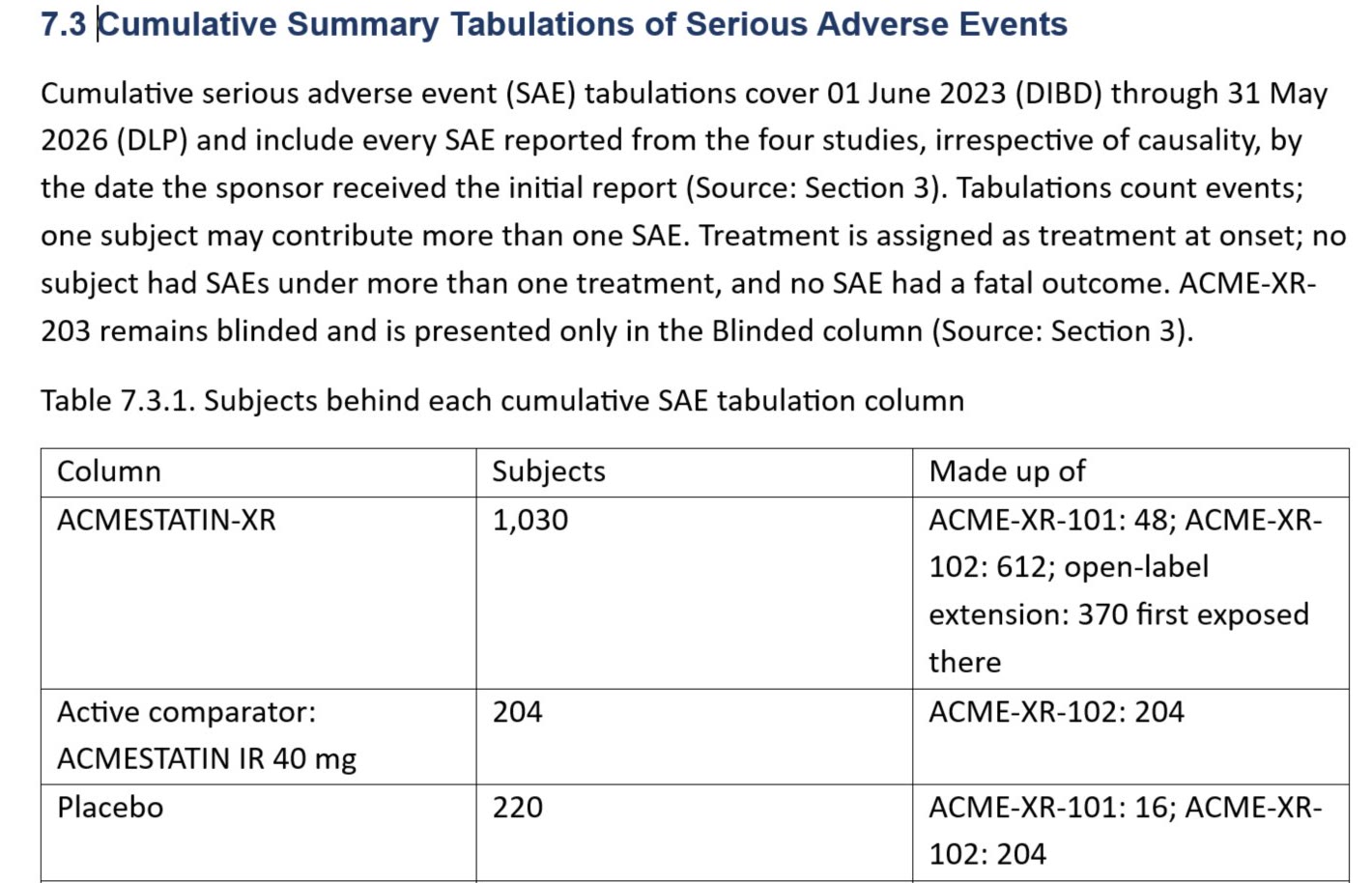
7.3 Cumulative Summary Tabulations of Serious Adverse Events
Cumulative serious adverse event (SAE) tabulations cover 01 June 2023 (DIBD) through 31 May 2026 (DLP) and include every SAE reported from the four studies, irrespective of causality, by the date the sponsor received the initial report (Source: Section 3). Tabulations count events; one subject may contribute more than one SAE. Treatment is assigned as treatment at onset; no subject had SAEs under more than one treatment, and no SAE had a fatal outcome. ACME-XR-203 remains blinded and is presented only in the Blinded column (Source: Section 3).
Table 7.3.1. Subjects behind each cumulative SAE tabulation column
Column: ACMESTATIN-XR. Subjects: 1,030. Made up of: ACME-XR-101: 48; ACME-XR-102: 612; open-label extension: 370 first exposed there.
Column: Active comparator: ACMESTATIN IR 40 mg. Subjects: 204. Made up of: ACME-XR-102: 204.
Column: Placebo. Subjects: 220. Made up of: ACME-XR-101: 16; ACME-XR-102: 204.
- This cumulative table covers 01 June 2023 to 31 May 2026. The annual reporting interval is 01 June 2025 to 31 May 2026.
- The table shows which studies make up each column, and the subject counts add up: 48 + 612 + 370 = 1,030, and 16 + 204 = 220. These are subjects, not SAE counts.
- The Checks panel flags numeric mismatches it detects. Review counts, dates and treatment columns against the source tables.
Can AI write a DSUR?
AI can draft a DSUR for expert review, and that is what PharmAssist does. It lays out the ICH E2F structure in Word, drafts each section from your reporting-period exposure tables, serious adverse event listings, study status and reference safety information. The pane lists the files used for the draft and displays candidate source passages where it finds a match. Review those passages against the original source. Numbers in the draft that do not appear in the sources are flagged. The safety physician still owns the evaluation and the benefit-risk conclusions.
How this document gets written today
A DSUR brings together a year of safety information from every ongoing trial of an investigational product. Writers reconcile exposure estimates, cumulative and interval SAE counts, study status and changes to the reference safety information, often from different teams and systems.
The hard part is consistency: the same count appears in the executive summary, the body and the tabulations, and it has to match everywhere and match the data lock point.
What your team can work on
Structure follows ICH E2F, with your sponsor template and conventions.
ICH E2F section drafts
Draft sections such as estimated cumulative exposure, interval and cumulative SAE summaries, significant findings from clinical trials and the overall safety assessment outline.
Reporting-period consistency
For a DSUR, review the annual interval separately from cumulative counts since the DIBD, and check that each count agrees across the executive summary, the body and the tabulations.
Missing and unsupported content checks
The Checks panel lists absent inputs and any number in the draft that is not in the sources, with a risk rating for unsupported content in the section.
Ask your own files
Ask questions in chat, for example how many SAEs were reported in a given study, and get answers that show which file they came from.
How it works for DSUR
Choose DSUR
Select Development Safety Update Report and the reporting period.
Add the safety data
Upload exposure and safety tabulations, study status, the reference safety information and the prior DSUR.
Draft and check
Draft each section and work through the checks and risk ratings.
Review in Word
Insert into Word and complete medical review and sign-off in your usual process.
What it drafts from
Select the approved sources for the task. Data handling follows the deployment and model-service configuration agreed with your team.
- Exposure estimates and safety tabulations
- Serious adverse event line listings
- Study status and new findings
- Reference safety information
- Prior DSUR
What stays with your team
PharmAssist supports your document workflow. Interpretation, medical and regulatory judgement, approval and submission stay exactly where they are today, with qualified people and your existing review chain.
Choose GenText-hosted SaaS or a private deployment. Confirm access, data handling, model services and retention during supplier qualification.
Security and deployment detailQuestions we are asked about this document
Does PharmAssist follow the ICH E2F structure?
Yes. The outline follows the ICH E2F section structure and your template. Your team confirms the final content.
Does it write the benefit-risk evaluation?
It can draft supporting text from the sources you supply, but the evaluation and conclusions are the safety physician’s judgement, and the draft is marked for expert review.
How does it avoid invented numbers?
Numbers in the draft that do not appear in the sources are flagged in the Checks panel and raise the section’s risk rating for unsupported content. The checks help review; read each value against its source.
Who reviews and approves the DSUR?
Your qualified specialists do. PharmAssist drafts and checks; scientific interpretation, medical and regulatory judgement, quality review and approval stay with your team and your existing review chain. Open questions and missing inputs stay visible in the draft until a person resolves them.
Does PharmAssist work inside Microsoft Word?
Yes. PharmAssist is a Microsoft Word add-in for Windows, Mac and Word on the web. You choose the document type, add your source files, review the outline and section drafts in a side pane, and insert approved text into the document you are already working on.
Where does our data go, and do we need a Veeva connection to begin?
Choose GenText-hosted SaaS or a private deployment. Data handling, model services and retention are confirmed with your technical owner during supplier qualification. A demonstration starts with fictitious documents and upload; connections to Veeva Vault or other source systems are scoped during implementation.
Teams that start here often widen to
Safety and periodic reports
Periodic Benefit-Risk Evaluation Report
Draft ICH E2C(R2) PBRER sections from cumulative and interval data.
Read more
Safety and periodic reports
Periodic Safety Update Report
Draft EU PSUR sections where every count has to add up.
Read more
Clinical trial documents
Clinical Study Reports
Draft ICH E3 CSR sections with source citations for review.
Read more
Talk to us about DSUR
Tell us your role, source material and next document milestone. We will confirm the demonstration scope and define a paid pilot with your team.
Prefer email? alex@gentext.ai